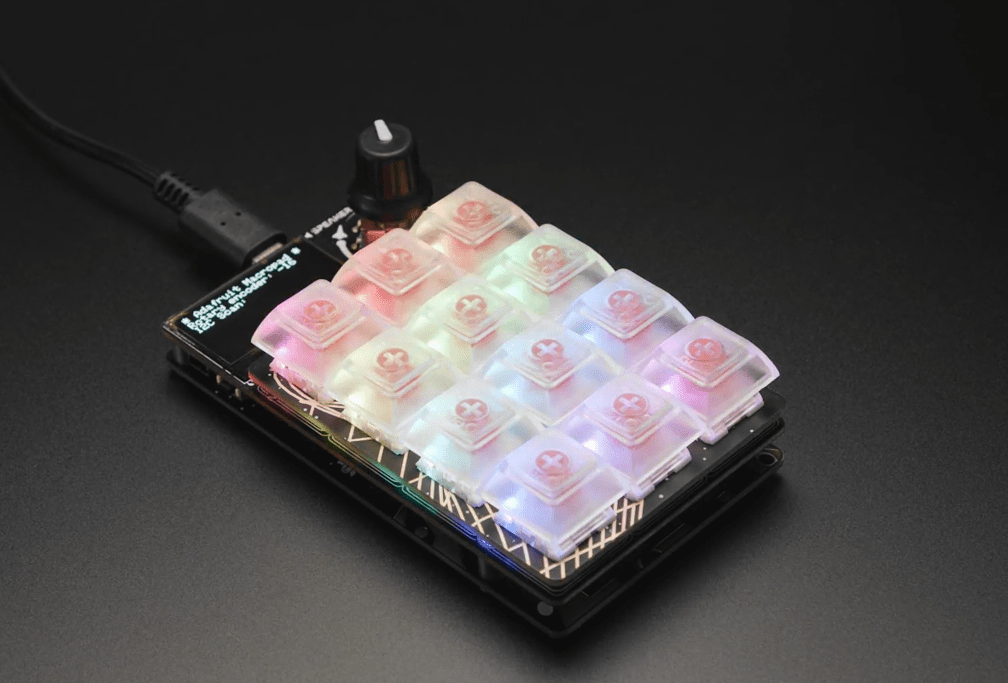
The Adafruit Macropad is a DIY programmable keypad. Currently I am using it to speed up my Altium workflow. Here is my Macro keybinds for Altium on the Macropad
Follow Adafruit’s Guide to Setup the Macropad.
Click here for more Altium Hotkeys
Adafruit Macropad Altium Macro List
| Schematic: Place GND | Schematic: Place VCC | Schematic: Place XDRC |
| Text: Place Ω | Text: Place ° | |
| Text: Place µ | Browser: Open toggl.com timer | |
| Run: Resistor Generator Program | Run: Altium | Browser: Open mouser.com |
Altium Schematic Hotkey Setup
I have used custom hotkeys for placing GND, VCC and XDRC. These hotkeys are:
| GND | SHIFT + ; |
| VCC | SHIFT + ‘ |
| No ERC | SHIFT + X |
To create a custom hotkey go to the Menu Toolbar Click > View > ToolBars > Customize.
In the Commands Tab find the Category of Hotkey Comand you would like to change.
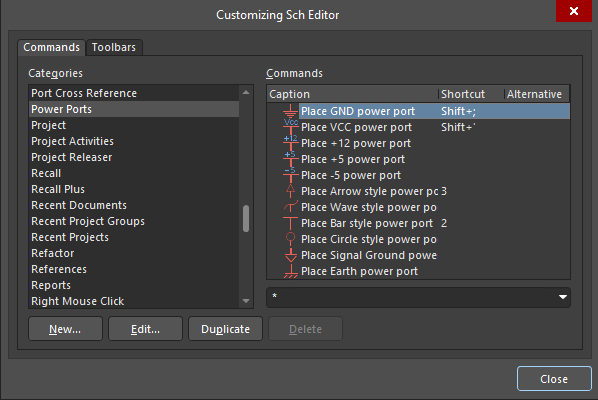
Double click the command you would like to change.
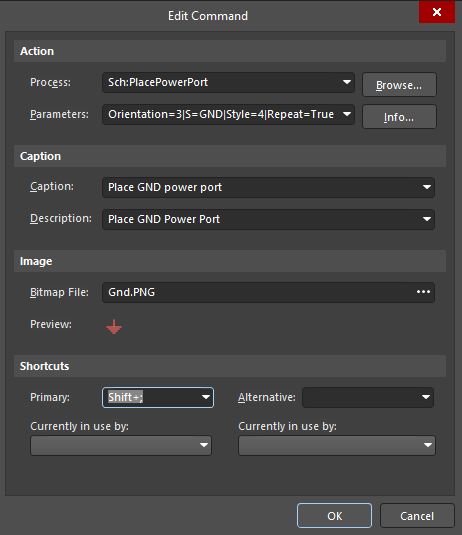
Shortcuts click in the Primary box and hold down the hotkey you wish to bind. Click OK to save
Altium Macro
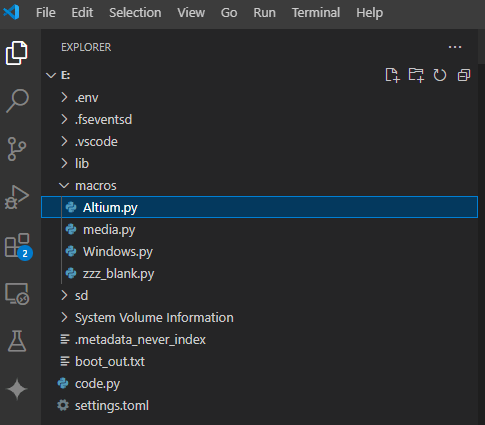
Here is the code for the Altium Macro. Save it as Altium.py in the Macro folder on the Macropad Drive and once saved the Macro will run.
# MIT License
# 2024 Mackie Notes
# Altium Schematic Hotkeys

import displayio
from adafruit_hid.keycode import Keycode
app = {                      # REQUIRED dict, must be named 'app'
    'name' : 'SCH Altium',   # Application name
    'macros' : [             # List of button macros...
        # COLOR    LABEL    KEY SEQUENCE
        # 1st row ----------
        (0xebdf34, 'GND',       [Keycode.SHIFT, Keycode.SEMICOLON]),        # Place GND Port
        (0xeb3434, 'VCC',       [Keycode.SHIFT, Keycode.QUOTE]),            # Place VCC Port
        (0xeb8934, 'XDRC',      [Keycode.SHIFT, Keycode.X]),                # Place No DRC
        # 2nd row ----------
        (0x002525, 'I', ['I']),                                             # AMPS: U+2C92 COPTIC CAPITAL LETTER IAUDA Ⲓ
        (0x004000, 'Omega',     [Keycode.ALT, Keycode.KEYPAD_TWO,
            Keycode.KEYPAD_THREE, Keycode.KEYPAD_FOUR]),                    # Write Ω
        (0x004000, 'deg',       [Keycode.ALT, Keycode.KEYPAD_PLUS,
            -Keycode.KEYPAD_PLUS, Keycode.KEYPAD_ZERO,
            -Keycode.KEYPAD_ZERO, Keycode.KEYPAD_ZERO,
            -Keycode.KEYPAD_ZERO, Keycode.B, -Keycode.B,
            Keycode.KEYPAD_ZERO, -Keycode.KEYPAD_ZERO, -Keycode.ALT]),      # Write °
        # 3rd row ----------
        (0x343aeb, "u", [Keycode.ALT,
            Keycode.KEYPAD_PLUS, -Keycode.KEYPAD_PLUS,
            Keycode.KEYPAD_ZERO, -Keycode.KEYPAD_ZERO,
            Keycode.KEYPAD_ZERO, -Keycode.KEYPAD_ZERO,
            Keycode.B, -Keycode.B,
            Keycode.KEYPAD_FIVE, -Keycode.KEYPAD_FIVE,
            -Keycode.ALT]),                                                 #Write µ
        (0x7a34eb, 'PRNT Win',          [Keycode.ALT,
            Keycode.PRINT_SCREEN, -Keycode.ALT,
            -Keycode.PRINT_SCREEN]),                                        # Print Screen Current Window
        (0xff33ce, 'Timer',          [Keycode.CONTROL, Keycode.ALT,
            Keycode.KEYPAD_FOUR, -Keycode.CONTROL, -Keycode.ALT,
            -Keycode.KEYPAD_FOUR, 2.0,'N']),                                # Run Timer Short Cut in Browser
        # 4th row ----------
        (0xebc934, 'Res Gen', [Keycode.ALT, Keycode.CONTROL,
            Keycode.KEYPAD_EIGHT, -Keycode.ALT,
            -Keycode.CONTROL, -Keycode.KEYPAD_EIGHT]),                      # Open Resistor Generator Program with shortcut
        (0xebc934, 'Altium', [Keycode.ALT, Keycode.CONTROL,
            Keycode.KEYPAD_NINE]),                                          # Open Altium With Shortcut
        (0xebc934, 'Mouse', [Keycode.CONTROL, Keycode.T,
            -Keycode.CONTROL, -Keycode.T,'https://au.mouser.com/\n']),      # Mouser in new tab
        # Encoder button ---
        (0x000000, '',          [])
    ]
}
Macro File Location
 Mackie Notes
Leave a comment